SPF stands for Sender Policy Framework.One can create SPF for a domain.It specifies which mail servers are permitted
to send mails on behalf your domain.Some mail servers don't accept incoming messages if it is coming from a domain that have no SPF record. So it's good idea to set it.
CPANEL - is widely used control panel on commercial Linux hosts. To setup SPF record for domain.

to send mails on behalf your domain.Some mail servers don't accept incoming messages if it is coming from a domain that have no SPF record. So it's good idea to set it.
CPANEL - is widely used control panel on commercial Linux hosts. To setup SPF record for domain.
- Login into Cpanel by tying http://example.com:2082 where example.com is your domain.
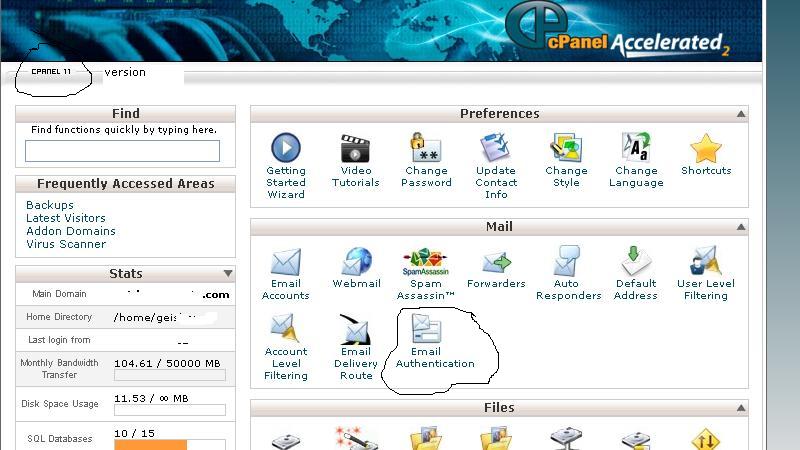
- To write this post I logged into Cpanel where Cpanel version is 11.It is displayed at top left hand corner of the cpanel.
- Now look for section mail
- Under mail look for "Email Authentication"
- Click on Email Authentication - Email Authentication in Cpanel
- Under SPF section status would be Disabled - Click Enable button.It will lead to following page
- By default current host is included in SPF record. Click on "Go Back" and you can see following. SPF record added.
- Now, You want to add "include" Google as email sending entity.Make sure before you start this SFP enabling you have already pointed MX record to Google mail exchanger.
- Now Go to "Include" section on SPF record configuration page add click "Add".A popup window appear put following value
__spf.google.com
Gmail for domain SPF record Added using CPANEL
- By default Cpanel appends "?all" at the end of SPF record.This is as good as none.If you are sure you would not send mail other that your hosted IP and Google Check "All entry (ALL)".
- Click Update. It will bring a status page
- SPF has been enabled.
Your raw SPF record is : v=spf1 a mx ip4:74.52.35.98 include:_spf.google.com -all - -all at the end that means all other hosts in the world which will try to relay email on behalf of your domain will be rejected.